
Smokace Casino Login
If you want to get to the fun fast, your Smokace Casino login is your main shortcut to games, bonuses, tournaments and our Shop with Coins. Once you’ve created an account, logging in takes a couple of seconds from any device.
Introduction to Smokace Account
At Smokace, your account is the key that unlocks games, bonuses, VIP, tournaments and our token‑based Shop. You can access it from the header buttons “Sign in” and “Create an Account” on desktop and mobile.
- Single profile for games, deposits, withdrawals and tokens.
- Quick navigation to Games, Live Casino, Promotions, VIP, Tokens and Shop from the side menu.
- 24/7 live chat and email support from your logged‑in profile if you ever need help.
Bottom line, once you are logged in, you control everything from one simple hub.
Creating Your Smokace Account
Now, let’s walk through how you actually register at Smokace so you can start playing.
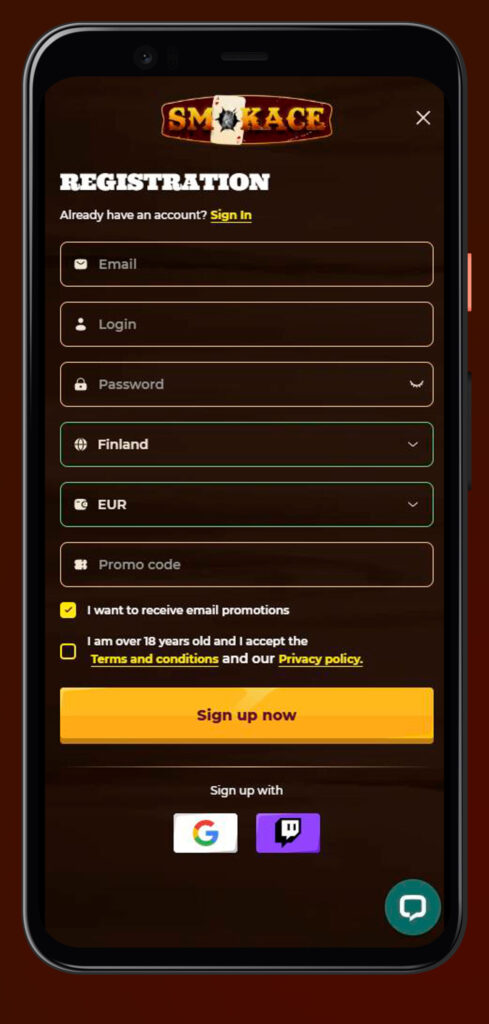
Step 1: Basic Registration Details
You start by hitting the “Create an Account” or “Sign Up” button in the Smokace header or side menu. A short form pops up where you add your basic login details like email, password and agree to the terms and privacy policy.
- Confirm you are of legal age and accept the casino rules.
- Use a real email you actually check; you’ll need it for password resets and verification.
- Pick a strong password with a mix of characters for better security.
Once you submit that, your Smokace profile is created, and you can move on to completion.
Step 2: Profile Completion
After the first step, you’ll see more profile options in your account area. Here you can fill in personal details that will be needed later for payments and KYC checks.
- Full name and date of birth exactly as in your documents.
- Country, address and contact data to match payment info.
- Optional settings like interface language in the side or header menu.
Finishing this early makes future Smokace withdrawals and verification smoother.
Step 3: Play Casino Games
Once signed up to Smokace, you can already explore the lobby and play for real money after your first deposit. Your account instantly works across all sections like Games, Live Casino, Tournaments, Tokens, Achievements and the Bonus Map.
- Deposit in euros, grab a welcome offer if you like and start spinning.
- Join tournaments or token events right from the main menu.
- Track bonuses and gifts in your profile and promo pages.
You don’t need any separate game accounts; everything sits under that one login.
Social Registration Options
Here’s the cool part: we also heavily feature social and external logins in our ecosystem, especially Telegram and Twitch in promos and widgets. On supported pages, you can use these existing accounts to speed up access and link them to your Smokace profile.
| Option | What it does for you |
| Classic login, full control | |
| Twitch | Easy link for streamers |
| Telegram | Fast access from promos/shop |
Honestly, using a social account keeps things quick, but always double‑check which email and currency get attached to your profile.
Login Process and Account Access
Once you’re signed up, logging back into Smokace Casino is super straightforward from any device.
Standard Login Method
To log in to Smokace normally, you just hit the “Sign in” button in the header or side menu. A compact window appears where you enter your registered email and password.
- Make sure the language flag matches the version of the Smokace site you registered on.
- If the data is correct, you’re taken straight to the lobby with Games, Live Casino and Promotions visible.
- You can log out anytime from your profile or menu if you’re on a shared device.
We recommend ticking “remember me” only on your own phone or laptop, not on public machines.
Login Across Devices
You can log into Smokace Casino from a desktop, laptop, tablet or phone using the same credentials. The layout adapts to your screen, but the Sign in and Create an Account buttons stay visible at the top or side.
- Same balance, tokens and achievements across all devices.
- Side menu with Games, Live Casino, Shop, VIP and Tournaments stays accessible on mobile.
- If you switch devices mid‑session, just log out on one and log in on the other.
Big plus, you don’t need multiple accounts or separate apps to keep playing.
Twitch and Google Account Login
We work closely with streaming and promo tools that use Twitch and Google logins, and you’ll see Twitch highlighted for some bonus banners and live chat‑related features. On integrated pages, this lets you jump in faster by connecting your existing Twitch or Google identity to Smokace.
- Use Twitch when you come from partner stream promos or tournaments.
- Google helps if you prefer signing in with your main email ecosystem.
- Once linked, you can usually log in to Smokace with one click instead of typing everything again.
If you ever unlink a social account, keep your Smokace email login active as a backup.
Password Recovery Options
If you forget your password, you don’t need to panic; the Smokace login window has a standard reset option. You’ll request a recovery email and follow the link to set a new password.
- Use the same email that you used when registering Smokace account.
- Check spam or promo folders if the reset link does not show up.
- If you still can’t get in, contact live chat or email
- support@smokace.com
- for manual help.
Try not to reset too often and avoid reusing old or obvious passwords.
Account Verification and Security
Here’s the thing, to keep your money and data safe, Smokace runs a standard AML and KYC framework, clearly linked in the footer as “AML‑KYC Policy”. This is required before larger withdrawals and sometimes before certain bonuses can be paid out.
KYC Verification Process
The KYC process is triggered when the team needs to fully confirm your identity and payment sources. You’ll follow the steps from the AML‑KYC Policy page and any extra instructions from support.
- Receive a request by email or in‑site messages to upload documents.
- Submit ID and address proof that match your profile details.
- Wait for the compliance team to review and approve the account.
During checks, withdrawals can be paused, so finishing KYC early is smart.
Two-Factor Authentication Setup
While the site focuses heavily on secure connections and internal risk rules, you should also add your own second layer of protection. 2FA can be set up using email codes or external authenticators, depending on the current security options in your profile.
- Activate additional confirmation for Smokace logins or withdrawals.
- Use an authenticator app or email OTP where supported.
- Store backup codes in a safe place, not on the same device.
This extra step makes account takeover attempts much harder.
Document Upload Requirements
For KYC, Smokace uses standard online‑casino documentation requirements that are explained in the AML‑KYC Policy section. All uploads go through secure channels and are stored in line with privacy rules from the Privacy Policy page.
| Document type | What it proves |
| Passport/ID | Identity and age |
| Utility bill/bank | Residential address |
| Card/e‑wallet | Ownership of the payment method |
Always make sure your photos are clear, in colour and show all four corners of the document.
Account Management Features
Once your Smokace Casino login is set up, you can tweak your account so it feels exactly how you like to play.
Profile Settings and Currency Selection
In your profile, you can adjust basic personal details and some interface preferences. Currency options and conversions are handled according to internal project rates that are referenced in the promo and terms pages.
- Review your Smokace sign-up data so it matches your documents.
- Check how euro deposits are converted from other currencies according to internal exchange rules.
- Change language from the flag icon in the header if needed.
If you plan big deposits or withdrawals, keep an eye on how those internal conversions impact your balances.
Linking Social Networks
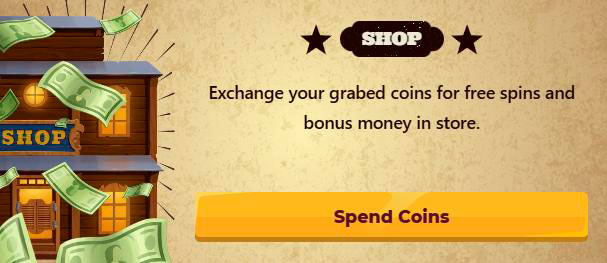
In parts of the site like bonus banners, achievements and shop offers, you’ll see heavy promotion of Telegram and sometimes Twitch. You can link these social accounts to get extra offers, notifications or faster access to certain features.
- Telegram is used for special shop and promo offers highlighted in banners.
- Twitch linking is handy if you follow Smokace streams or partner streamers.
- You can usually manage these links from within your profile or dedicated promo pages.
We recommend only linking socials you actively use, so you don’t miss out on event messages.
Troubleshooting Login Issues
If you ever have trouble logging in to Smokace, there are a few quick checks you can do before calling for backup.
- Confirm you’re on the correct Smokace domain and language version shown by the logo and flag.
- Double‑check email and password for typos, especially on mobile keyboards.
- Try the password reset option from the login window or switch browsers.
- Clear cookies if the site behaves oddly around the Sign in button.
If nothing works, jump into live chat from the landing page widget or email support@smokace.com with your account details so the team can investigate.

FAQ
You click “Create an Account” in the header or side menu, fill in your email and password, agree to the terms, and then complete your profile with personal details.
Yes, the same Smokace login works across desktop, laptop and mobile, with your balance, tokens and achievements synced everywhere.
Use the reset link from the Sign in window to request a recovery email, then follow the instructions, or contact live chat and email support if the email does not arrive.
Yes, sooner or later, you’ll need to pass KYC checks under the AML‑KYC Policy by uploading ID and address documents so withdrawals and higher‑risk operations can be approved.
Smokace handles verification under dedicated AML‑KYC and Privacy Policy pages, storing your documents via secure channels in line with online‑casino compliance standards.